LoRaWAN Gateway Network Configuration
CHARP uses Kerlink Wirnet iFemtoCell evolution gateways, connected to the ThingPark Enterprise platform by Actility.
When is network configuration needed?
Gateways are configured to use 4G by default and require no network configuration. This guide is only relevant if you want to use an Ethernet connection on a managed or locked network.
On corporate or institutional networks, Ethernet ports are often locked down by IT policies. In these cases, your IT department will need to whitelist the gateway and open the required ports.
Connection methods
The gateway supports two connection methods to the ThingPark platform:
- IPSec -- encrypted tunnel using IKE and ESP protocols
- TLS -- encrypted connection using stunnel
We recommend asking your IT department to support both IPSec and TLS connections for maximum flexibility and failover capability.
Information for your IT department
Provide your IT department with the following:
- Gateway MAC address -- found on the label on the underside of the gateway
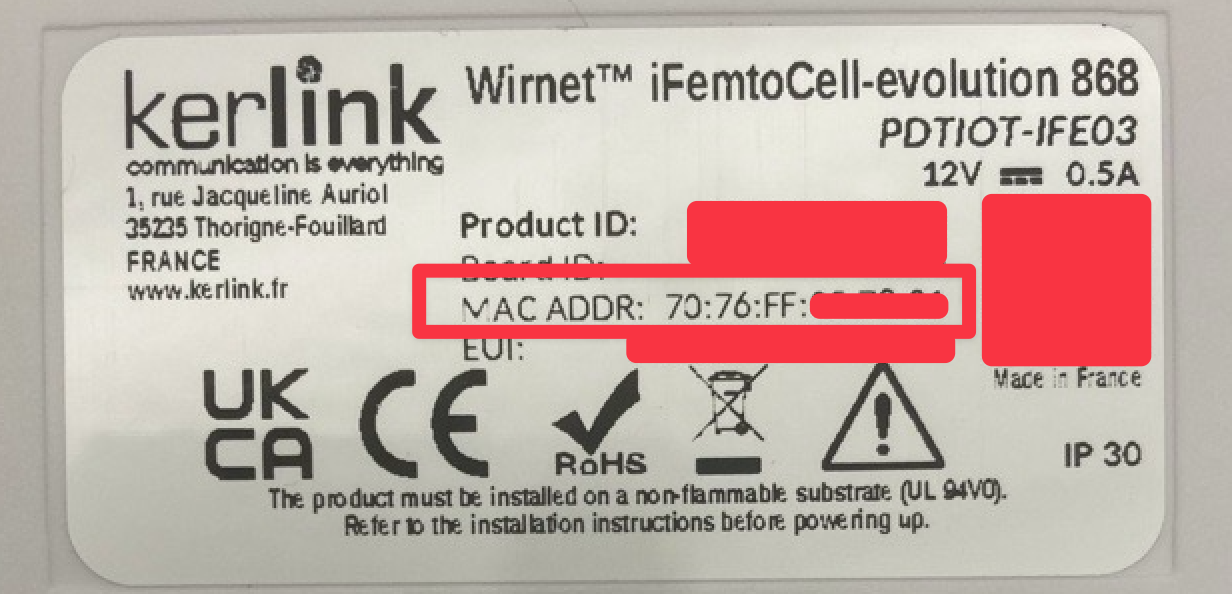
Required network flows
LRR flows (IPSec)
| # | From System | From App | Type | Protocol | Dest Port | To System | To App | Description |
|---|---|---|---|---|---|---|---|---|
| i6 | LRR | IKE | IPSec | UDP | 500, 4500 | LRC | IKE | IKE negotiation for IPSec tunnel |
| i7 | LRR | ESP | IPSec | ESP | -- | LRC | ESP | Encapsulated Security Payload |
| i7a | LRR | stunnel | TLS | TCP | 3001--3003 | LRC | stunnel | TLS tunnel (fallback) |
| i8a | LRR | ICMP | Network | ICMP | -- | LRC | ICMP | Connectivity check |
| i10 | LRR | DNS client | Network | UDP | 53 | DNS | DNS server | DNS resolution |
| i11 | LRR | DHCP client | Network | UDP | 67, 68 | DHCP | DHCP server | IP address assignment |
| i11b | LRR | SFTP client | File transfer | TCP | 22 | SFTP | SFTP server | Firmware updates |
| i9 | LRR | SSH client | Management | TCP | 22 | SMS | SSH server | Remote management |
| i17 | LRR | NTP client | Network | UDP | 123 | NTP | NTP server | Time synchronization |
LRR flows (TLS)
| # | From System | From App | Type | Protocol | Dest Port | To System | To App | Description |
|---|---|---|---|---|---|---|---|---|
| i7a | LRR | stunnel | TLS | TCP | 3001--3003 | LRC | stunnel | TLS tunnel for LRR data |
| i8a | LRR | ICMP | Network | ICMP | -- | LRC | ICMP | Connectivity check |
| i10 | LRR | DNS client | Network | UDP | 53 | DNS | DNS server | DNS resolution |
| i11 | LRR | DHCP client | Network | UDP | 67, 68 | DHCP | DHCP server | IP address assignment |
| i11b | LRR | SFTP client | File transfer | TCP | 22 | SFTP | SFTP server | Firmware updates |
| i9 | LRR | SSH client | Management | TCP | 22 | SMS | SSH server | Remote management |
| i17 | LRR | NTP client | Network | UDP | 123 | NTP | NTP server | Time synchronization |
If using TLS only, ensure that TCP ports 3001--3003 are open for outbound traffic. If using IPSec, UDP ports 500 and 4500 must also be open, along with the ESP protocol (IP protocol 50).